OVERHEAD LINE PATROL COURSE

Welcome to your Overhead Line Patrol Course. This is a selfstudy course supported by accredited instructors via our DELP E-Learning Group on WhatsApp. Please read the guidelines and instructions below and thereafter, start with STEP 1 below and complete each step carefully.
You are required to be engaged for a minimum of 8 hours each day, including your exam time. 

Course and Exam Instructions

  1. Modules to Complete
    Today, you must complete Modules 1 to 3 in preparation for your exam. You are required to use a Highlighter Pen to highlight ALL the bold text in your modules. 

  2. Exam Time
    Exams are usually scheduled for 14:30, but please monitor the DELP E-Learning group for official announcements. 

  3. Delegates are expected to log in 15 minutes prior to the exam.

  4. Assessment Requirements
    – You will be assessed on the contents of Modules 1–3.
    – A minimum score of 80% is required to be deemed competent.
    – If you do not achieve 80%, you may immediately rewrite the exam.
    – By logging in, you confirm your agreement to be assessed.

  5. Exam Format
    – The exam is Multiple Choice and Open Book. You are required to mark all the correct answers for each question. 

    – If you have special needs , please contact Erik on WhatsApp at 082 060 7550 before starting your exam.

  6. Data & Privacy
    – Exam copies and results will be temporarily stored on this site, then archived offline for 12 months before permanent deletion.
    – Devoltage Training Centre complies with the POPIA Act – your privacy is our priority.

  7. Certificates
    – On successful completion, certificates will be emailed to your Company’s HR Department or Management.
    – Private delegates who paid for their own courses will receive certificates directly via the email address provided.

  8. Next Steps
    – Please proceed with STEP 1 below and complete each following step.
    – Once finished, you may log out and continue studying your course modules.
STEP 1: DOWNLOAD AND PRINT YOUR COURSE MODULES

Click on the Red Button to download the modules and make sure to save the file on your PC / Laptop or Mobile Phone where you can easily find it. After you downloaded the file, you need to print it, HIGHLIGHT THE BOLD TEXT and use it to study and prepare for your Exam.

The Regulations require each student /delegate to have a hard copy of the Course Modules.

STEP 2: WATCH THE FOLLOWING VIDEOS

The Videos below will give you very important insights and background of the Course Material. Please make sure to watch each one.  

STEP 3: HIGHLIGHT YOUR COURSE MATERIAL

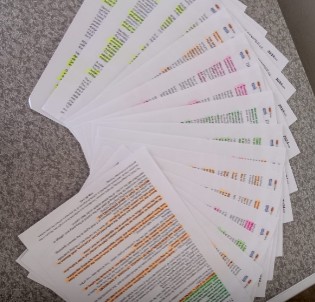
Start by writing your Name and ID number visibly on the front page of your Course Module. Now take a highlighter pen and highlight ALL the bold text. ONLY a highlighter pen may be used. Before 14:00, take a picture of your highlighted Modules and share it on the DELP E-Learning Group on WhatsApp as per the example below.

  1. Remember to write your name and ID number on the front page.
  2. The importance of this is for you to be able to easily find the correct answers during exam time.
  3. Once you have done this, and shared your proof on the WhatsApp group, you can continue studying your course material until exam time.
  4. If you have any questions about the content of the Course material, you may ask your questions on the WhatsApp Group. Our instructors are on standby to assist you with any questions you may have.  

STEP 4: Writing Exam

  • You will be assessed on Modules 1 to 3 in the form of a Multiple Choice Openbook Exam
  • You need to achieve 80% to be competent. Should you not achieve 80% you may rewrite immediately. 
  • Your Exam times will be announced, based on the time that you logged in for your Courses. The Regulations stipulate that you need to be engaged for a minimum of 8 hours to do your Course and write exam. 
  • If you get stuck with a question during your exam, you may ask for assistance from the instructors on the DELP E-LEarning Group on WhatsApp. Simply take a picture of the question with your phone and share it on the DELP E-Learning Group. Note that the Instructors are not obliged to help you with every question.
  • All the answers for the exam are in your Course modules. It is YOUR responsibility to look up the correct answers.
  • You will use the same Username and Password to log in for your exam, once instructed to do so. On the Exam page you will see a Contact Form. You need to complete the Contact form correctly. Make sure your names and surname are spelt correctly and that your ID number is correct to ensure that your Certificate is issued with the correct details. 
  • After completing the Contact form, you need to click on the blue “Start Quiz” button to start the exam. 
  • At the end of your exam, you will see a “SUBMIT” button. When you are done, click on this button to upload your Exam and Confirm that you submitted your exam on the DELP E-Learning Group. If your Exam was not submitted properly to reflect on our Database for whatsoever reason, you will need to redo your exam immediately. 
  • Your results will be shared directly with you on your WhatsApp number.
  • Note that by logging in for the Exam, you confirm your agreement to be assessed.  

Thank you for chosing Devoltage Training Centre and Devoltage E-Learning Platorm. We wish you all success with your Course.

Scroll to Top